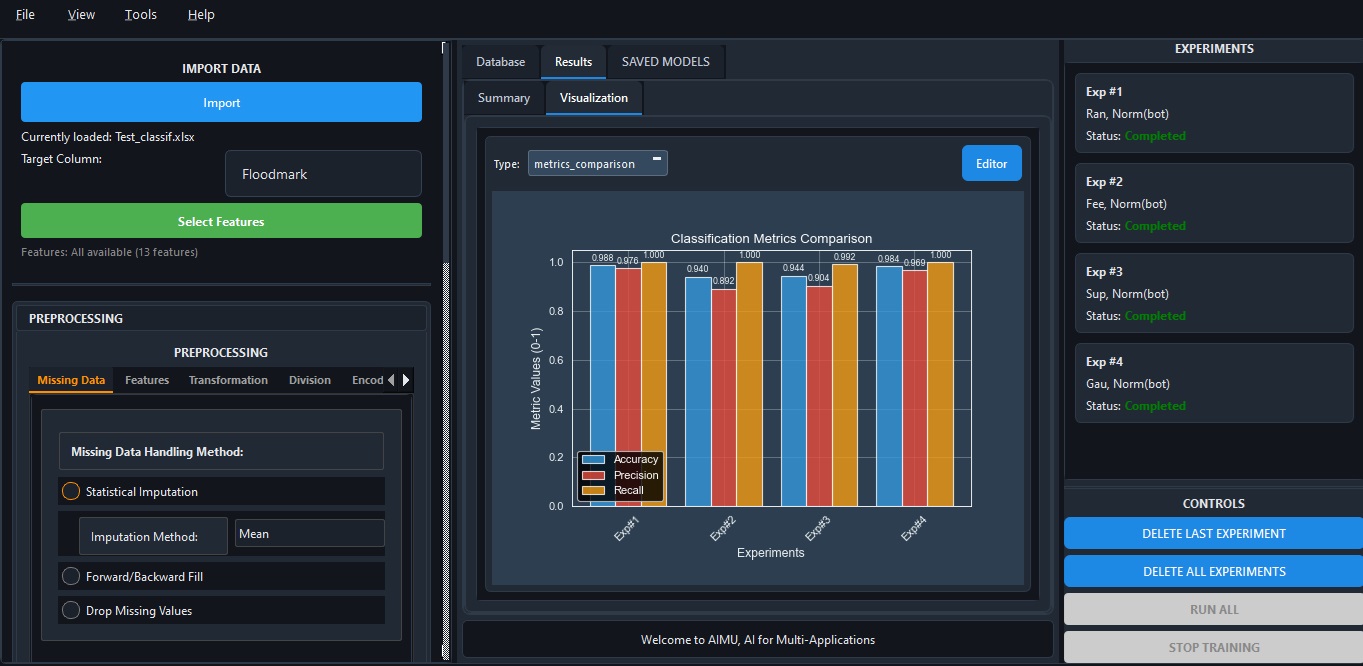
AIMU brings spatial data, classical ML, and deep learning into one desktop workflow — without forcing your research data into the cloud. We are selecting early users from labs, universities, and technical teams before the public release.
Spatial layers
Model training
Evaluation & metrics
Sensitive rasters, field surveys, and client datasets never leave the machine — no upload, no third-party storage, no review cycle with IT.
Training a CNN for eight hours costs you electricity, not GPU-hours. No per-seat cloud fees for your lab or your students.
Air-gapped networks, field laptops, restricted university environments — AIMU runs wherever Windows runs, online or offline.
Four things AIMU does that fragmented stacks struggle with — integrated GIS + AI, offline execution, reproducible projects, and honest scope.
Prepare spatial data, engineer features, train ML and DL models, and review results in one desktop app — no gluing tools together.
Multi-raster sampling, shapefile support, coordinate systems, and interactive mapping sit alongside Random Forest, SVM, CNN, LSTM, GRU, and Time-Series Transformers.
AIMU is a workbench, not a black box. Preprocessing, training, and evaluation are inspectable; you choose every model parameter, and every run is saved with its config.
Preprocessing, model configuration, and evaluation are saved with each project, so you can reproduce runs, compare models, and hand work off.
Running spatial modeling for environment, earth observation, hydrology, agriculture, or geoscience — and wanting one tool instead of five.
Building ML and DL models on geospatial or tabular data without handing datasets to a third-party cloud.
Standardizing a local, reproducible AI pipeline across students and staff — without cloud lock-in or recurring per-seat cloud costs.
A typical AIMU project moves through five stages — load, preprocess, train, compare, evaluate — all saved in one reproducible project file. Example workflow: import rasters and shapefiles, prepare predictors, train a model, compare metrics, and save the full experiment in one project.
Import rasters, shapefiles, and tabular datasets; browse coordinate systems and spatial layers.
Handle missing data, normalize, transform, and engineer features ready for spatial ML.
Random Forest, SVM, and other classic ML, plus CNN, LSTM, GRU, and Time-Series Transformers.
Run and compare experiments side by side — with tuning, clear metrics, and reproducible project state so you can justify every model choice.
Inspect results, export outputs, and reload saved models to run predictions on new data.
Your data stays on your hardware. No silent telemetry of project contents, no remote training queue, no vendor lock-in.
Runs on your Windows machine, online or offline. Built to sit next to your data.
Projects capture preprocessing, model configuration, and evaluation together.
Early users are reviewed before access. Pricing and public downloads reopen when the release funnel is ready.
Quick answers to the things customers ask most.
No. AIMU runs spatial processing, training, and evaluation on your local hardware. Online access is used for controlled access and license-related checks, not for cloud training.
Yes. You can deactivate AIMU on one machine and reactivate it on another (e.g., upgrading your lab laptop).
No functional restrictions. The Student license includes the full workbench feature set but is legally restricted to non-commercial, academic use.
Yes, for Team/Lab licenses. Please contact our sales team to arrange invoice billing and university procurement.
AIMU is entering private beta with selected researchers, labs, and technical teams. Tell us your workflow and we’ll review whether the current build fits your use case.